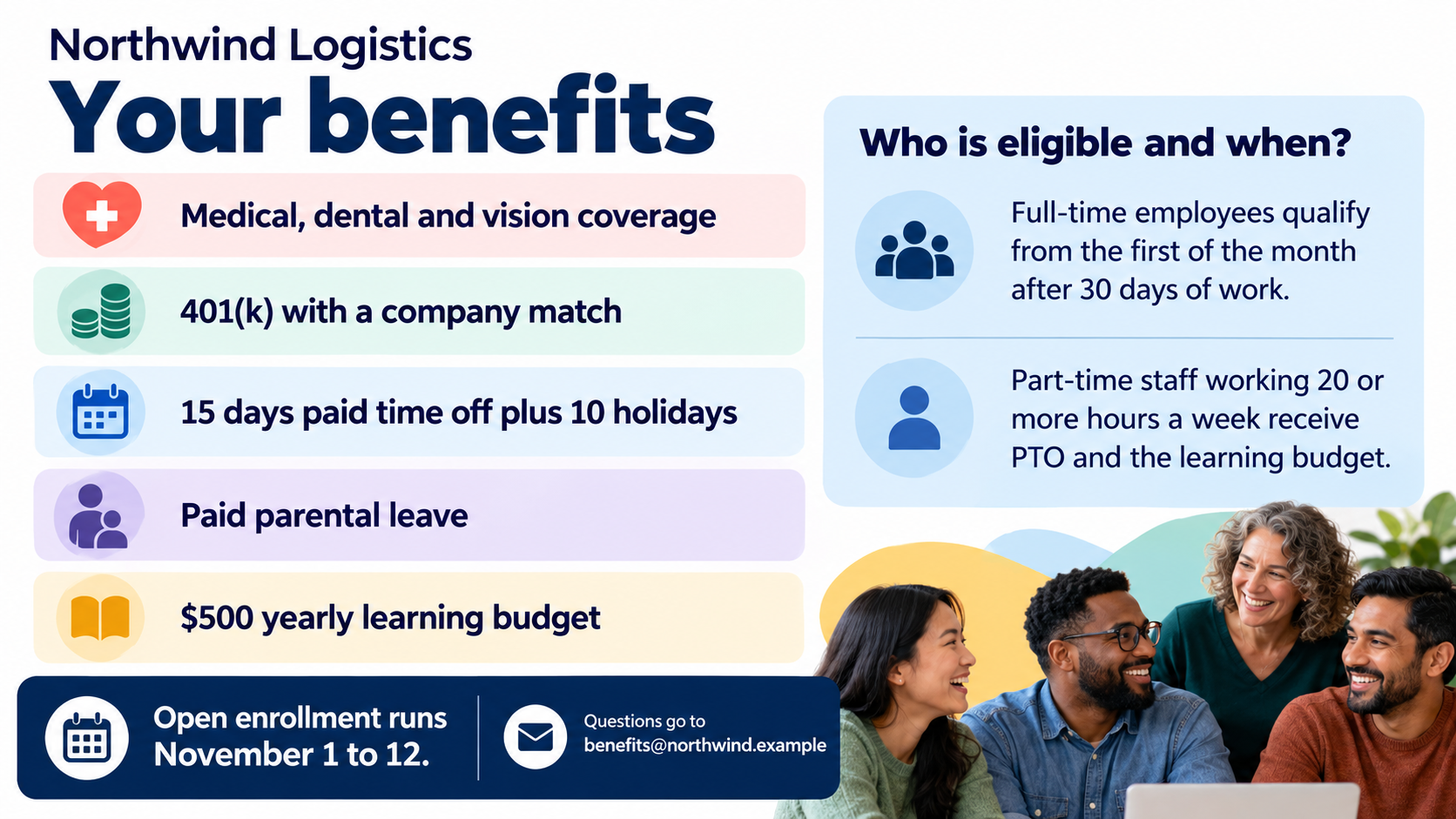
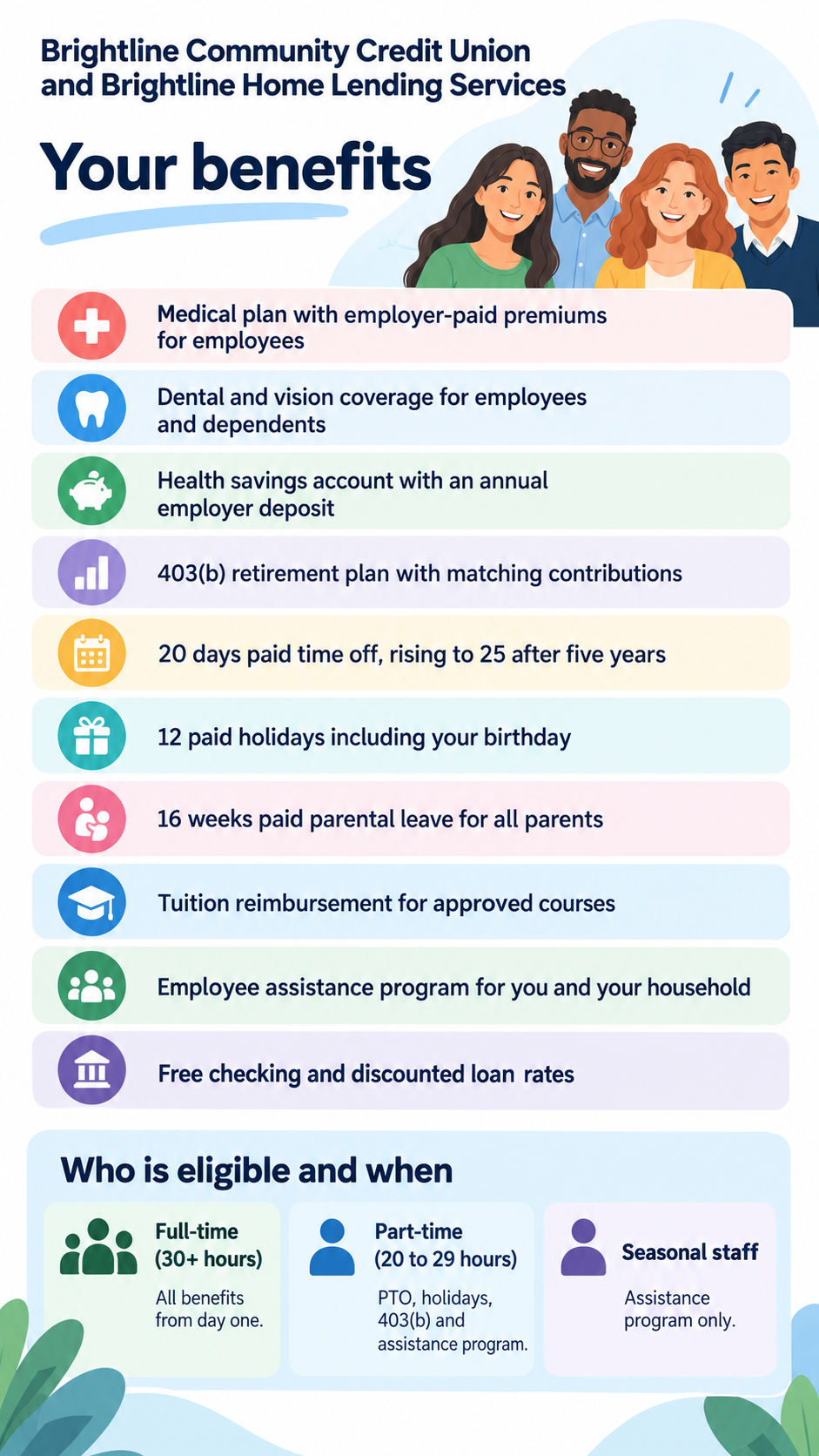
Employee benefits flyer with eligibility shown beside each benefit.
Summarize the benefits your company has confirmed, and who qualifies for them, in one icon-led flyer for new hires, open enrollment or break-room screens.
One generated flyer image that lists your confirmed benefits with simple icons and gives eligibility the same visual weight, not fine print. It summarizes only what you enter; have whoever owns the benefits wording check every amount and condition.
Logistics company open enrollment reminder with five benefits
Company or team name
Northwind Logistics
Confirmed benefits, one per line
Medical, dental and vision coverage
401(k) with a company match
15 days paid time off plus 10 holidays
Paid parental leave
$500 yearly learning budget
Who is eligible and when
Full-time employees qualify from the first of the month after 30 days of work. Part-time staff working 20 or more hours a week receive PTO and the learning budget.
Enrollment dates or where to ask (optional)
Open enrollment runs November 1 to 12. Questions go to benefits@northwind.example
Where it will be used (optional)
Open enrollment reminder on break-room screens and the intranet
Ten detailed benefits with tiered eligibility and no contact line
Company or team name
Brightline Community Credit Union and Brightline Home Lending Services
Confirmed benefits, one per line
Medical plan with employer-paid premiums for employees
Dental and vision coverage for employees and dependents
Health savings account with an annual employer deposit
403(b) retirement plan with matching contributions
20 days paid time off, rising to 25 after five years
12 paid holidays including your birthday
16 weeks paid parental leave for all parents
Tuition reimbursement for approved courses
Employee assistance program for you and your household
Free checking and discounted loan rates
Who is eligible and when
Full-time (30+ hours) - all benefits from day one.
Part-time (20 to 29 hours) - PTO, holidays, 403(b) and assistance program.
Seasonal staff - assistance program only.
Enrollment dates or where to ask (optional)
Left empty
Where it will be used (optional)
Left empty
Ten long benefit lines and three eligibility tiers, with no contact or purpose. Checks that each tier keeps its exact list, that the day counts and hours survive unchanged, and that the flyer groups items instead of shrinking them into footnotes.
Same task, three directions
Pick a direction to start from.
01
Icon grid
A tidy two-column grid with one line icon per benefit, and eligibility in a full-width tinted box so it cannot be missed.
02
New-hire welcome
A warm illustrated header of coworkers and a checklist of benefits, suited to onboarding packets and welcome emails.
03
Open enrollment reminder
Dates first, then the benefits, then who qualifies, in a calm palette that works on break-room screens and intranet banners.
What the template keeps
The parts that stay consistent.
01
Eligibility beside the benefits
Conditions are shown at a readable size next to the list, never hidden as small print.
02
Your wording, your numbers
Amounts, percentages and day counts are placed as entered, not rounded or rephrased.
03
Generic icons only
Simple pictograms stand in for each benefit, with no carrier or provider branding.
How to use it
From details to a result.
01
Enter only confirmed benefits
Copy the wording from your current plan summary, one benefit per line, including exact amounts and day counts.
02
Describe who qualifies
Write the eligibility rules plainly. If a benefit applies to one group only, say so here.
03
Add dates and purpose
Enrollment dates or a contact line are optional, and the purpose helps set the emphasis.
04
Review with your benefits owner
After generating in Vizify, have HR or whoever owns the plan wording check every line before the flyer goes out.
Output boundaries
What to check before you use it.
This is a visual summary, not a plan document. If your policy requires a line pointing readers to the plan documents, include it yourself.
Generated text can contain mistakes. Check every amount, percentage, date and eligibility rule before sharing.
More than six to eight benefits crowd the layout; group them or split them across two flyers.
Insurance carrier, retirement provider and company logos are not reproduced.
The result is one image, not a print-ready file, an editable document or a multi-page benefits guide.
QuestionsCan I make an employee benefits infographic with this?+
Yes. The flyer is laid out like an infographic, with an icon per benefit and a separate eligibility panel. It does not chart numbers; for a chart of plan costs, use a chart tool with your data.
Will it fill in benefits we haven't listed?+
No. Only the lines you enter appear. It never adds perks, amounts, carriers or disclaimers to make the flyer look fuller.
How do I show that some benefits only apply to full-time staff?+
Say so in the eligibility field, for example by listing each group with the benefits it receives. The flyer keeps those tiers side by side with the list.
Should HR or legal review the flyer?+
Yes. Have whoever owns the benefits wording compare the result with your plan documents before you share it with employees or candidates.
Can I use it at a recruiting event?+
You can. Name the recruiting event in the purpose field and keep the benefits limited to what you already publish to candidates.