Value proposition canvas matching your offer to one customer segment.
Set one customer's jobs, pains and gains against your products, pain relievers and gain creators, with each reliever and creator tied to the pain or gain it answers.
One value proposition canvas with the customer profile on one side and your value map on the other, each reliever and creator naming the pain or gain it answers. The reply lists any pain or gain you have not matched. Check both sides against your notes.
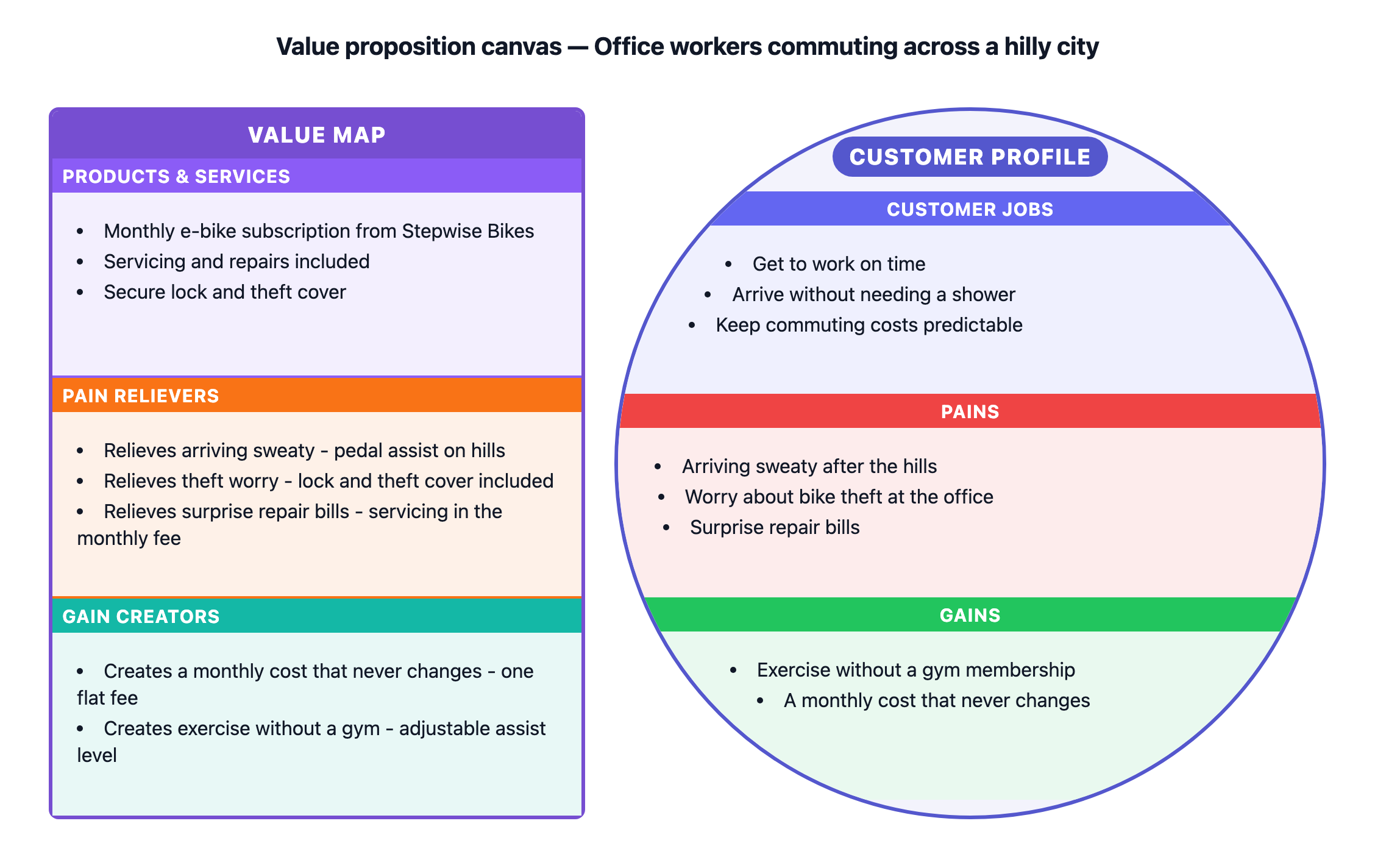
E-bike subscription for hilly-city commuters, every pain and gain matched
Customer segment
Office workers commuting across a hilly city
Customer jobs
Get to work on time
Arrive without needing a shower
Keep commuting costs predictable
Pains
Arriving sweaty after the hills
Worry about bike theft at the office
Surprise repair bills
Gains
Exercise without a gym membership
A monthly cost that never changes
Products and services
Monthly e-bike subscription from Stepwise Bikes
Servicing and repairs included
Secure lock and theft cover
Pain relievers and gain creators
Relieves arriving sweaty - pedal assist on hills
Relieves theft worry - lock and theft cover included
Relieves surprise repair bills - servicing in the monthly fee
Creates a monthly cost that never changes - one flat fee
Creates exercise without a gym - adjustable assist level
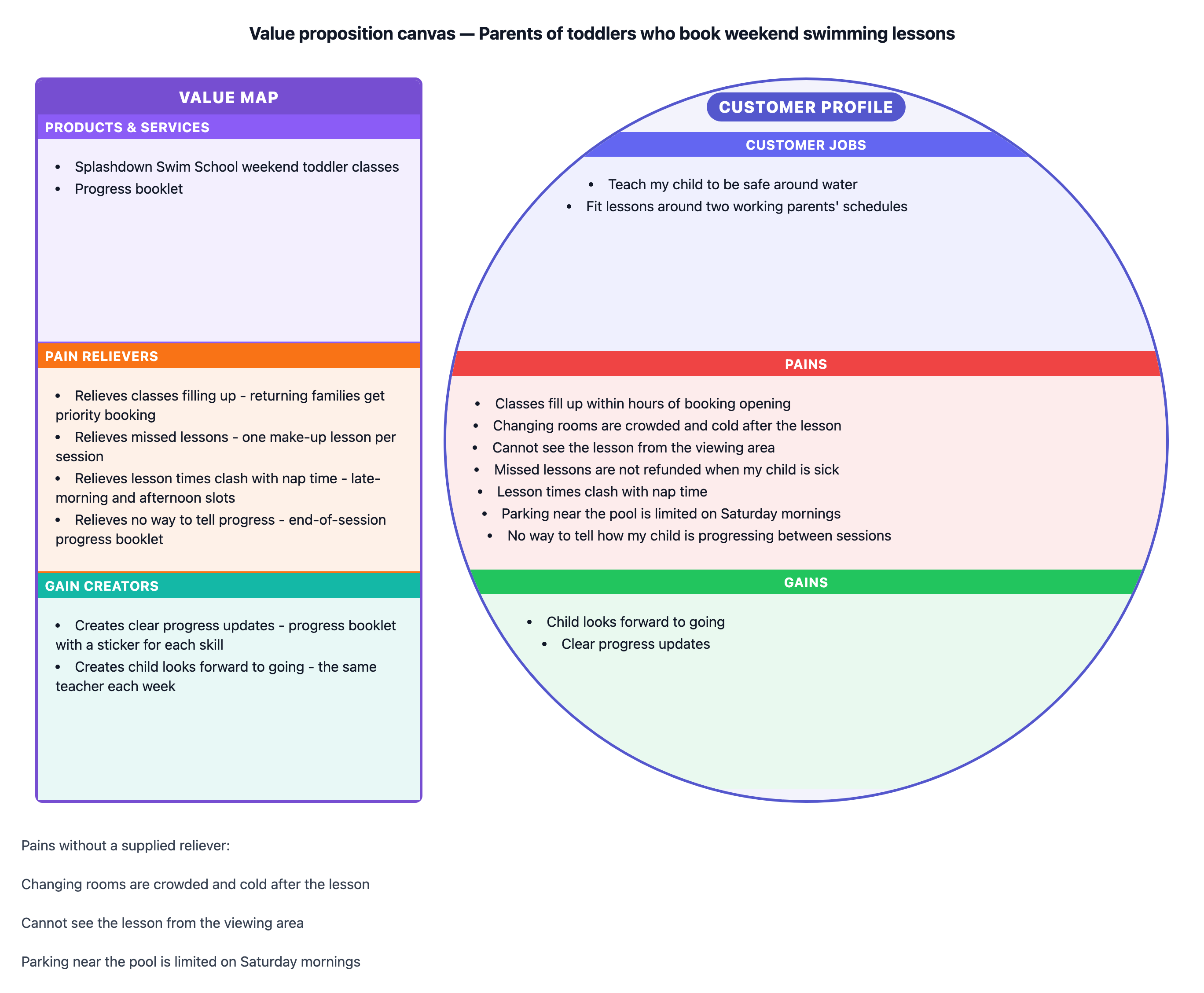
Seven pains, three left unmatched, with long items
Customer segment
Parents of toddlers who book weekend swimming lessons
Customer jobs
Teach my child to be safe around water
Fit lessons around two working parents' schedules
Pains
Classes fill up within hours of booking opening
Changing rooms are crowded and cold after the lesson
Cannot see the lesson from the viewing area
Missed lessons are not refunded when my child is sick
Lesson times clash with nap time
Parking near the pool is limited on Saturday mornings
No way to tell how my child is progressing between sessions
Gains
Child looks forward to going
Clear progress updates
Products and services
Splashdown Swim School weekend toddler classes
Progress booklet
Pain relievers and gain creators
Relieves classes filling up - returning families get priority booking
Relieves missed lessons - one make-up lesson per session
Relieves lesson times clash with nap time - late-morning and afternoon slots
Relieves no way to tell progress - end-of-session progress booklet
Creates clear progress updates - progress booklet with a sticker for each skill
Creates child looks forward to going - the same teacher each week
Three pains have no reliever. Checks that they are listed as gaps in the reply rather than answered with invented features, and that long pains and relievers stay whole in their sections.
Same task, three directions
Pick a direction to start from.
01
Fit check for one offer
Every reliever and creator placed next to the pain or gain it answers, with the gaps listed after the canvas for your next planning session.
02
Assumptions before customer interviews
The whole customer profile marked as assumptions, so the team can see what still needs to be tested with real customers.
03
Current and planned offer
What you already provide next to features you are planning, marked in your own words, to see which pains the plans address.
What the template keeps
The parts that stay consistent.
01
Two sides that correspond
Each reliever and creator names the pain or gain it answers, so readers can trace the fit.
02
Gaps left visible
Pains and gains with no answer are listed, not filled with a made-up feature.
03
Your customer's words
Jobs, pains and gains keep the wording you gathered.
How to use it
From details to a result.
01
Choose one customer segment
A canvas describes one group. Make another canvas for a second segment.
02
Describe the customer profile
The jobs they are trying to get done, the pains in the way and the gains they want, one per line.
03
Describe your value map
List your products and services, then write each reliever or creator with the pain or gain it answers.
04
Review in Vizify, then check the gaps
Nothing runs until you send. Read the list of unmatched pains and gains in the reply after the canvas renders.
Output boundaries
What to check before you use it.
One customer segment per canvas. A second segment needs its own canvas.
Vizify does not research customers or test fit. The gap list is based only on how you matched items.
The six sections are fixed. The segment appears in the title rather than as a separate box.
Layout is automatic and long items crowd small sections. Export formats depend on the Vizify App.
QuestionsIs there a value proposition canvas example on this page?+
Yes. The standard example matches an e-bike subscription to commuters in a hilly city. The boundary example shows a swim school with several pains still unmatched.
How do I show which pain reliever answers which pain?+
Start each line with "Relieves", name the pain, then describe the reliever. The pain's name stays in the text so the two sides line up.
What if a pain has no reliever yet?+
Leave it unmatched. The reply lists it as a gap, which is often the most useful thing a canvas shows.
How is this different from a lean canvas?+
A lean canvas covers a whole business idea in nine boxes. A value proposition canvas looks closely at one customer segment and how well your offer answers their needs.