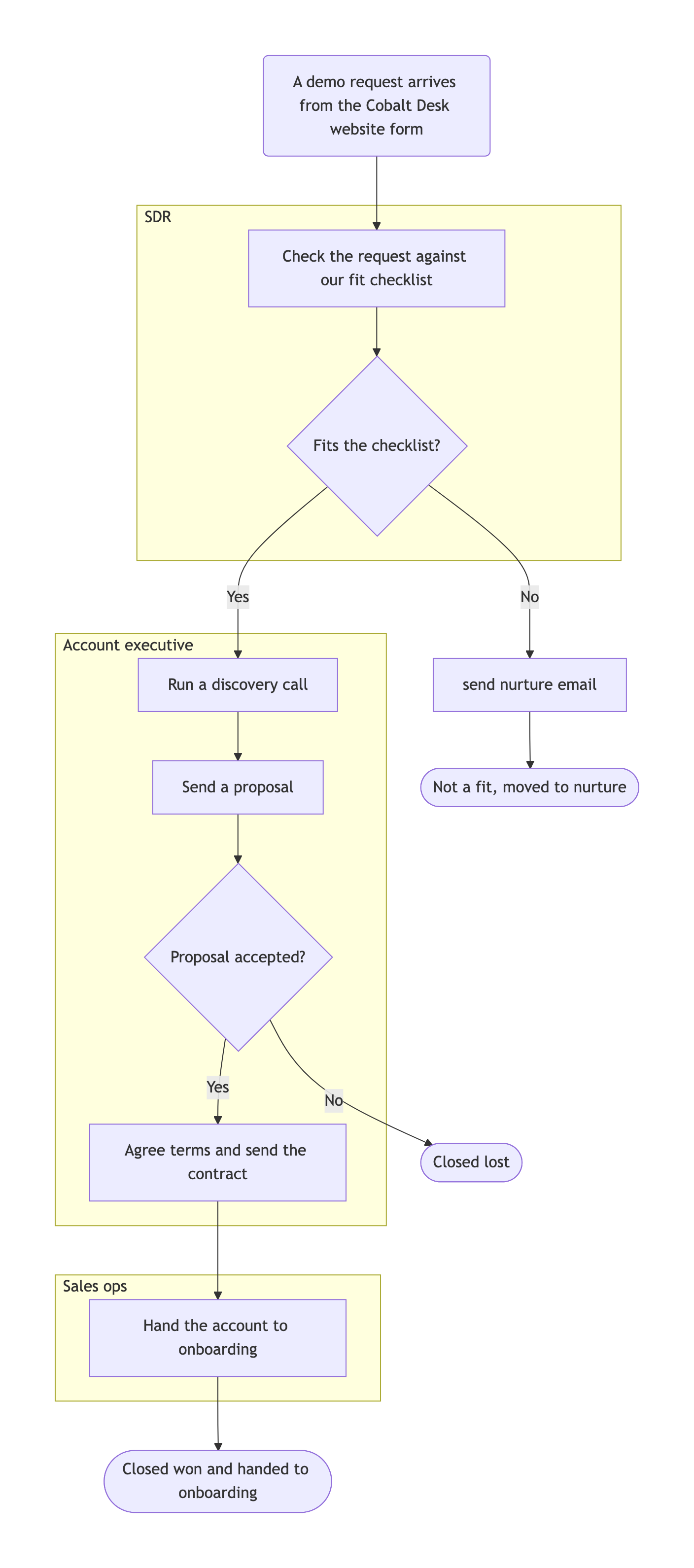
One flowchart that starts at your trigger, runs through your steps and decisions, and ends only at the outcomes you list. Each decision shows its labeled branches. Walk every path from start to finish and check the owners before sharing it.
Inbound demo request to closed deal, two decisions and three outcomes
Where the process starts
A demo request arrives from the Cobalt Desk website form
Steps in order, as role | step
SDR | Check the request against our fit checklist
Account executive | Run a discovery call
Account executive | Send a proposal
Account executive | Agree terms and send the contract
Sales ops | Hand the account to onboarding
Decisions and where each branch goes
Fits the checklist? Yes → discovery call. No → send nurture email, close as not a fit
Proposal accepted? Yes → contract. No → close lost
Every way the process ends
Closed won and handed to onboarding; Closed lost; Not a fit, moved to nurture
Layout
Top to bottom, one lane per role
When redlines are not agreed, which Account executive step should the arrow return to, and what is the exit from that loop?
Boundary input
Enterprise deal with a negotiation loop and a three-way branch
Where the process starts
Partner referral from a reseller for a multi-site enterprise rollout
Steps in order, as role | step
Partner manager | Log the referral and confirm the reseller agreement is current
Account executive | Run discovery with IT, finance and the operations sponsor
Solutions engineer | Deliver a tailored demo using the customer's sample workflows
Account executive | Send the proposal and pricing for all sites
Legal | Review redlines on the master services agreement
Account executive | Countersign and hand over to onboarding
Decisions and where each branch goes
Security review needed? Yes → send questionnaire, then proposal. No → proposal
Customer response to proposal? Accept → Legal review. Request changes → revise proposal and resend (up to two rounds, then escalate to sales director). Decline → close lost
Redlines agreed? Yes → countersign. No → back to the Account executive
Every way the process ends
Closed won; Closed lost; Escalated to sales director
Layout
Left empty
Checks that the revision loop stops after two rounds and exits to the escalation outcome, that the three-way branch has three labeled edges, and that long role and step names wrap without being cut.
Same task, three directions
Pick a direction to start from.
01
Swimlane view by role
Steps grouped into one lane per role, so each team sees its own part of the process and where deals change hands.
02
Slide-width overview
A short left-to-right version of the main path for a sales kickoff slide, with detail kept for a second diagram.
03
Lost-deal paths highlighted
The paths that end in a lost or disqualified deal drawn in a different style, for reviewing where deals leave the process.
What the template keeps
The parts that stay consistent.
01
Every branch labeled
Each arrow leaving a decision says which answer it belongs to.
02
Every path ends
No branch trails off. Each one reaches an outcome you listed.
03
Your process wording
Step names, roles and outcomes stay as you wrote them.
How to use it
From details to a result.
01
Name the trigger
The event that starts a deal in your process, such as a form fill, a referral or an outbound reply.
02
List the steps with their owners
One line per step, in order, starting with the role that does it.
03
Write each decision as a question
Say where each answer goes. Include loops and how they stop, such as a limit on proposal revisions.
04
List every outcome, then review in Vizify
Won, lost and any other ending. The brief opens for review and nothing runs until you send it.
05
Walk every path
Follow each branch from the trigger to an outcome. Fix gaps in one revision request.
Output boundaries
What to check before you use it.
Vizify draws the process you describe. It does not check that the process is a good one or that it matches what your team does.
This is a diagram, not a designed infographic. Icons, illustrations and brand typography are not part of a Mermaid flowchart.
Past about twenty steps a single chart gets hard to read. Split it into an overview and a detailed chart for one stage.
Node placement is automatic. Export formats are the ones the Vizify App offers for diagrams.
QuestionsCan I get a flow chart infographic of my sales process?+
This template makes a clean flowchart diagram rather than an illustrated infographic. It suits documentation, onboarding and internal slides where the logic matters more than decoration.
How do I show a step that repeats, like proposal revisions?+
Write it as a decision with a limit, such as "up to two rounds, then escalate". Every loop needs a way out, and Vizify asks if one is missing.
Can I show which team owns each step?+
Yes. Start each step with the role and ask for lanes in the layout field. The steps are grouped by role, which reads like a swimlane sales process graphic.
What if our process has more than one starting point?+
Choose the main trigger for this chart and mention the other in the additional direction. If the paths are very different, make a separate chart for each.