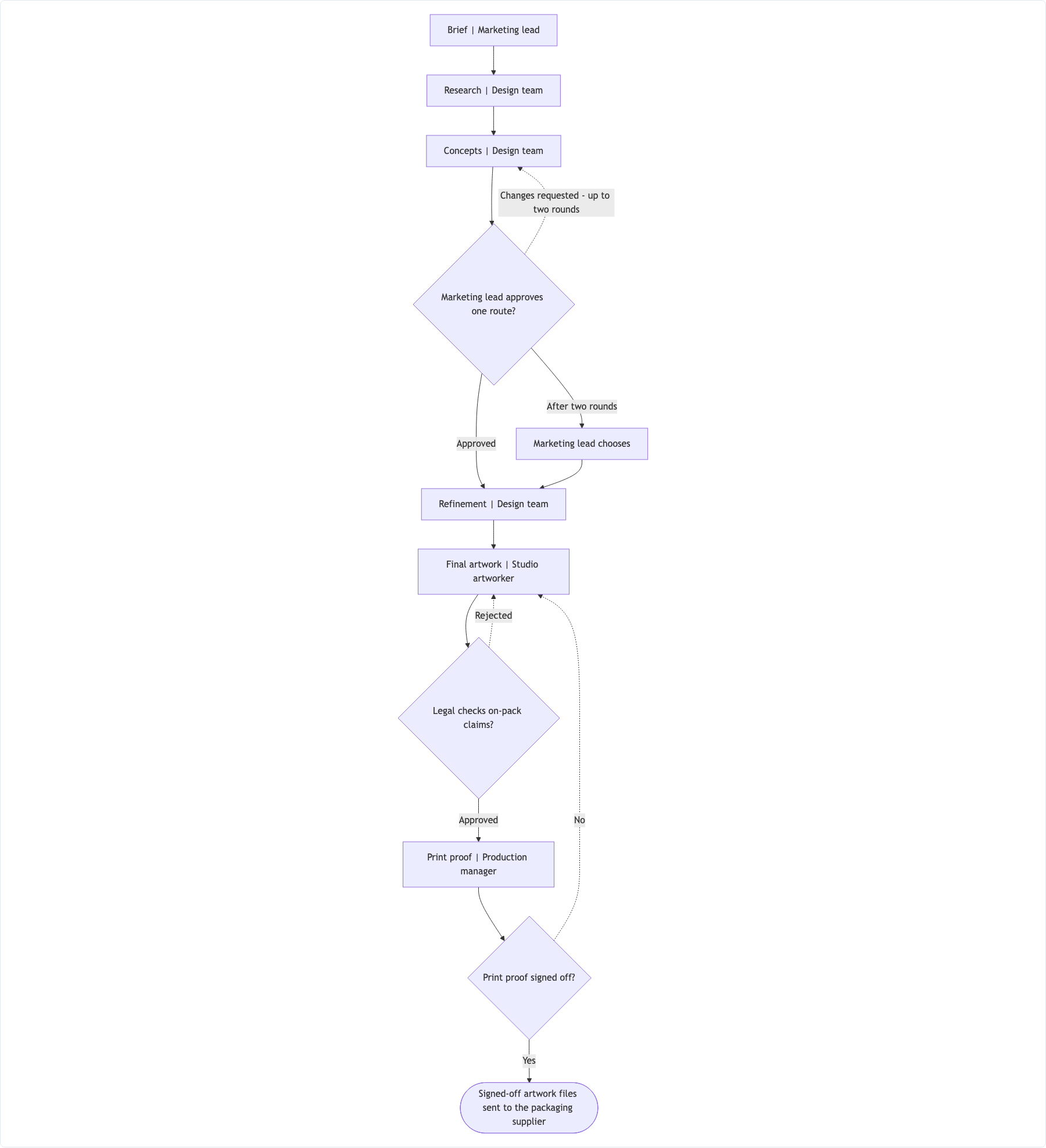
One flowchart of your design stages with their owners, each approval gate as a decision, and every feedback loop drawn back to the stage it returns to, with its round limit. Check each loop's exit and each approver before sharing the process.
Packaging redesign with three gates and three feedback loops
Project and team
Packaging redesign for Oakmoor Tea's loose-leaf range, in-house studio
Stages in order, as stage | owner
Brief | Marketing lead
Research | Design team
Concepts | Design team
Refinement | Design team
Final artwork | Studio artworker
Print proof | Production manager
Approval gates and where feedback goes
After Concepts - Marketing lead approves one route? Changes requested → back to Concepts, up to two rounds, then Marketing lead chooses. Approved → Refinement
After Final artwork - Legal checks on-pack claims? Rejected → back to Final artwork. Approved → Print proof
Print proof signed off? No → back to Final artwork. Yes → handoff
Where the process ends
Signed-off artwork files sent to the packaging supplier
Layout
Top to bottom, feedback loops as dashed arrows
After the third rejected template round is escalated to the library director, what decision or ending should follow? The supplied flow only names the approved development handoff.
Boundary input
Three-way gate, parallel stages and a loop that escalates
Project and team
Website redesign for the Brookfield Public Library, delivered by an outside agency with a library steering group
Stages in order, as stage | owner
Discovery workshops with library staff and patrons | Agency strategist
Information architecture and page inventory | Agency UX designer
Visual design concepts | Agency visual designer
Illustration set for event categories | Freelance illustrator
Responsive page templates and component library | Agency UX designer
Build handoff | Agency project manager
Approval gates and where feedback goes
Visual design concepts and the illustration set happen at the same time, then both go to review
Steering group review? Approve → templates. Approve with minor changes → templates with changes logged. Reject → back to Discovery workshops
Templates accepted by the library web lead? No → back to templates, up to three rounds, then escalate to the library director
Where the process ends
Approved templates handed to the development team
Layout
Left empty
Checks that the three-way gate has three labeled edges, the parallel stages branch and rejoin before review, the three-round loop exits to an escalation ending, and long stage names are not cut.
Same task, three directions
Pick a direction to start from.
01
Phases you have named
Stages grouped into the phases your team already uses, such as a double diamond, with loops kept where they happen.
02
Agency and client lanes
Your team's stages and the client's approvals in separate lanes, so everyone can see who holds the work at each point.
03
Sprint across days
A short left-to-right flow for a design sprint, one column per day you list, with test feedback looping back to the prototype.
What the template keeps
The parts that stay consistent.
01
Loops return to the right stage
Each feedback arrow points at the stage you named, with its round limit on the label.
02
Approvers are named
Every gate shows who makes the decision.
03
Your stage names
Stages and owners use your team's own terms.
How to use it
From details to a result.
01
List the stages and owners
One line per stage in order, with the person or team who owns it.
02
Add the approval gates
Say who approves after which stage and what each outcome means.
03
Point every loop somewhere
Name the stage feedback returns to and any limit on rounds, plus what happens when the limit is reached.
04
Review in Vizify, then walk the loops
The brief waits for you to press Send. Afterwards, follow each loop to its exit before sharing the chart.
Output boundaries
What to check before you use it.
The chart shows how work moves. It does not schedule stages, set deadlines or track real approvals.
Durations and dates appear only if you write them. For a timeline, ask for a Gantt chart as a separate request.
Parallel work is drawn as a branch that rejoins. Detailed dependencies between many tasks are hard to read in one flowchart.
Layout is automatic, and many loops can cross each other. Saving and sharing depend on the export options in the Vizify App.
QuestionsHow do I show that feedback sends work back a stage?+
In the approvals field, say which stage the work returns to, such as "Changes requested → back to Concepts". It becomes a labeled arrow to that stage.
Can the design process flowchart show client approvals separately?+
Yes. Ask for lanes by owner in the layout field, or use the agency and client lanes direction. Client decisions then sit in their own lane.
Does it work for any design method?+
Yes. Use your own stage names, whether you follow a double diamond, a sprint or your studio's own steps. Nothing is renamed to fit a method.
What if a review can end in more than yes or no?+
List every outcome, such as approve, approve with minor changes and reject. Each one gets its own labeled arrow.