Behavior flow chart from your school's approved policy steps.
Turn the steps in your school's approved behavior policy into a clear flowchart for staff, with the check after each step, any safety override and where the process ends.
One flowchart of your approved behavior steps, in order and in your policy's wording, with a check after each step, the safety override you describe and every end point. The source is named on the chart. Check it against the policy before displaying it.
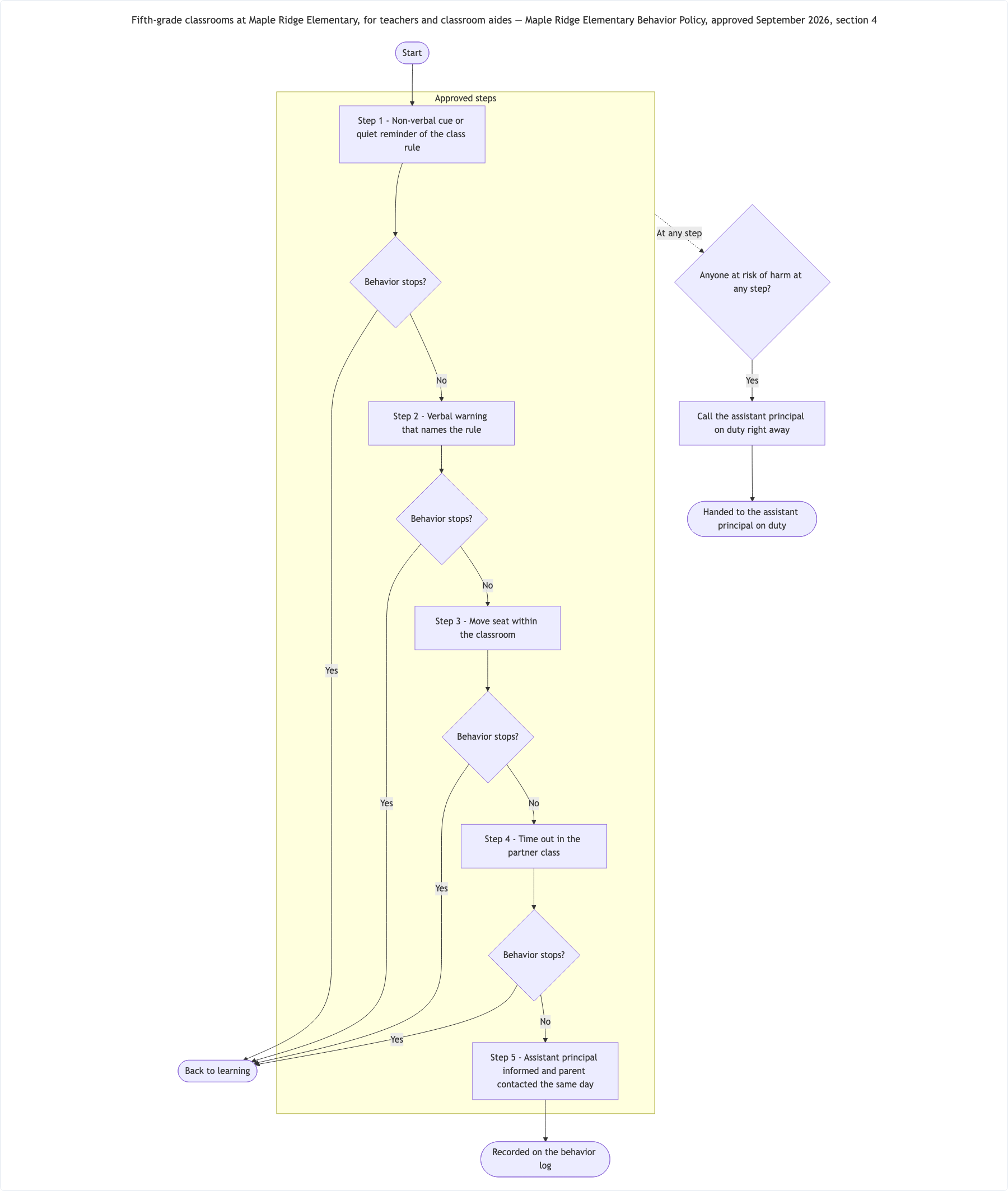
Five-step classroom response with a safety override
Setting and who uses the chart
Fifth-grade classrooms at Maple Ridge Elementary, for teachers and classroom aides
Approved steps, in order
Step 1 - Non-verbal cue or quiet reminder of the class rule
Step 2 - Verbal warning that names the rule
Step 3 - Move seat within the classroom
Step 4 - Time out in the partner class
Step 5 - Assistant principal informed and parent contacted the same day
When to move on, and any override
After Steps 1 to 4 - behavior stops? Yes → back to learning. No → next step
After Step 5 → record on the behavior log
Anyone at risk of harm at any step → call the assistant principal on duty right away
How the process can end
Back to learning; Recorded on the behavior log; Handed to the assistant principal on duty
Policy this comes from
Maple Ridge Elementary Behavior Policy, approved September 2026, section 4
Repeated reminder, an individual-plan branch and long step wording
Setting and who uses the chart
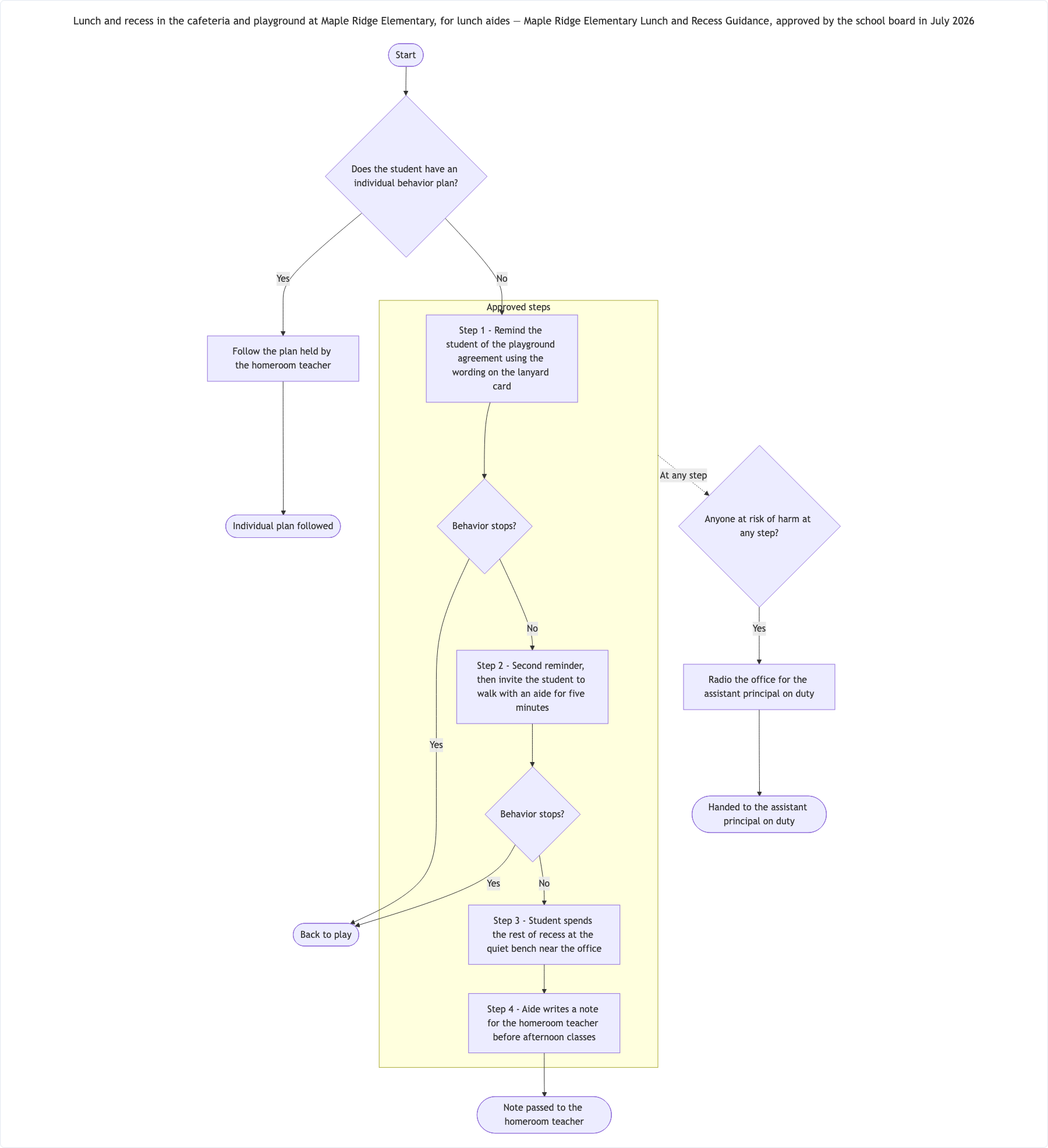
Lunch and recess in the cafeteria and playground at Maple Ridge Elementary, for lunch aides
Approved steps, in order
Step 1 - Remind the student of the playground agreement using the wording on the lanyard card
Step 2 - Second reminder, then invite the student to walk with an aide for five minutes
Step 3 - Student spends the rest of recess at the quiet bench near the office
Step 4 - Aide writes a note for the homeroom teacher before afternoon classes
When to move on, and any override
Does the student have an individual behavior plan? Yes → follow the plan held by the homeroom teacher. No → Step 1
After Steps 1 and 2 - behavior stops? Yes → back to play. No → next step
Anyone at risk of harm at any step → radio the office for the assistant principal on duty
How the process can end
Back to play; Note passed to the homeroom teacher; Individual plan followed; Handed to the assistant principal on duty
Policy this comes from
Maple Ridge Elementary Lunch and Recess Guidance, approved by the school board in July 2026
Checks that the individual-plan decision exits before Step 1, that long lanyard wording is kept exactly, that the override is drawn once, and that Step 3 flows to Step 4 because no check was given there.
Same task, three directions
Pick a direction to start from.
01
Staff wall chart
Numbered steps down the page with the safety override running alongside, for display in a classroom or staff lounge.
02
Lunch and recess version
The steps for lunch aides only, using the wording from your lunch and recess guidance rather than the classroom policy.
03
Student-facing chart with approved student wording
A simpler chart that uses the student-friendly wording your school has already approved, such as a class charter.
What the template keeps
The parts that stay consistent.
01
Your policy wording
Steps appear word for word, with the numbering from your policy.
02
One override, clearly marked
A safety route that applies at any step is drawn once and styled so it stands out.
03
The source on the chart
The policy name and approval date stay visible with the chart.
How to use it
From details to a result.
01
Paste the approved steps
Copy them from your policy in order, with the numbering and wording staff already know.
02
Add the checks and the override
Say what is checked after each step and what happens at any point if someone is at risk.
03
List the end points and the source
Every way the process can finish, plus the policy name and date so readers know what the chart reflects.
04
Review in Vizify, then check against the policy
Nothing is created until you send. Compare every box with the policy before the chart goes on a wall.
Output boundaries
What to check before you use it.
Vizify does not check your policy against law, statutory guidance or safeguarding procedures. The chart shows the wording you supply.
This is for a whole-school or class process. Leave students' names and personal details out; individual plans stay with your staff.
Time limits, sanctions and contacts appear only if they are in the text you paste.
Layout is automatic, and long steps make tall boxes. How you save or share it depends on the export options in the Vizify App.
QuestionsCan I use our exact behavior policy wording?+
Yes, and you should. Paste the approved steps as they appear in the policy. They are kept word for word, so the behavior flow chart matches what staff have been trained on.
Can I make a version for students?+
Yes, if your school has approved student-friendly wording, such as a class charter. Paste that wording; Vizify does not simplify the staff policy on its own.
Does the chart make sure our process follows official guidance?+
No. It draws the process you describe and checks only that every path has an end. Your school remains responsible for the policy itself.
How do I show a safeguarding concern?+
Add your school's own escalation step, such as calling the designated lead, as an override that applies at any step. No contacts or procedures are added for you.