One flowchart of your sequence, with the trigger, each email and wait in order, your branch conditions and every exit. It is a planning diagram only; nothing is sent or scheduled. Check wait times, loop limits and exits against the setup in your email platform.
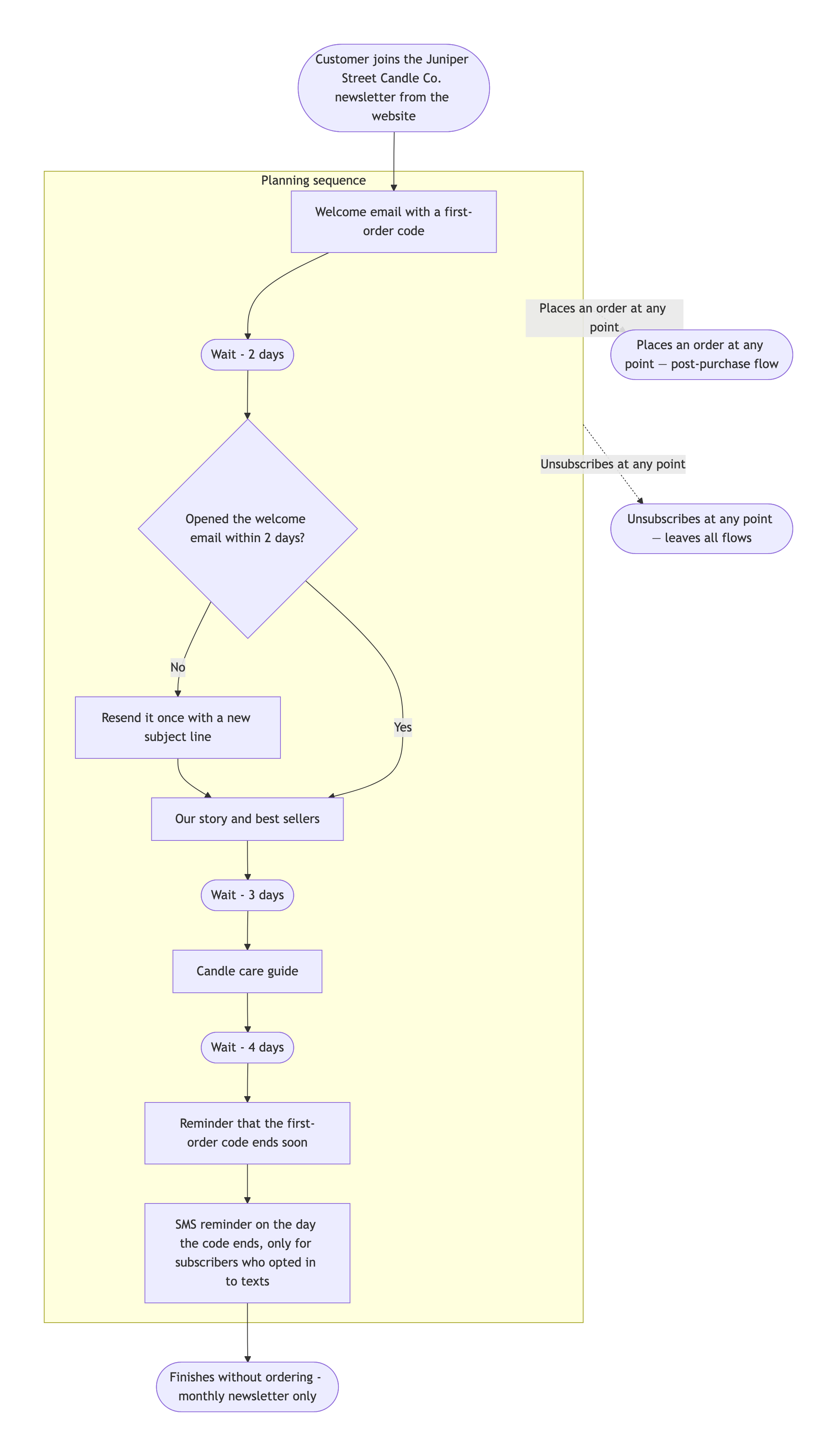
Four-email welcome series with a resend branch and three exits
Trigger event
Customer joins the Juniper Street Candle Co. newsletter from the website
Emails and waits, in order
Send - Welcome email with a first-order code
Wait - 2 days
Send - Our story and best sellers
Wait - 3 days
Send - Candle care guide
Wait - 4 days
Send - Reminder that the first-order code ends soon
Branch conditions
Opened the welcome email within 2 days? No → resend it once with a new subject line, then continue. Yes → continue
Placed an order at any point? Yes → exit to the post-purchase flow
Every way a subscriber leaves the flow
Places an order → post-purchase flow; Unsubscribes → leaves all flows; Finishes without ordering → monthly newsletter only
Other channels in the flow
SMS reminder on the day the code ends, only for subscribers who opted in to texts
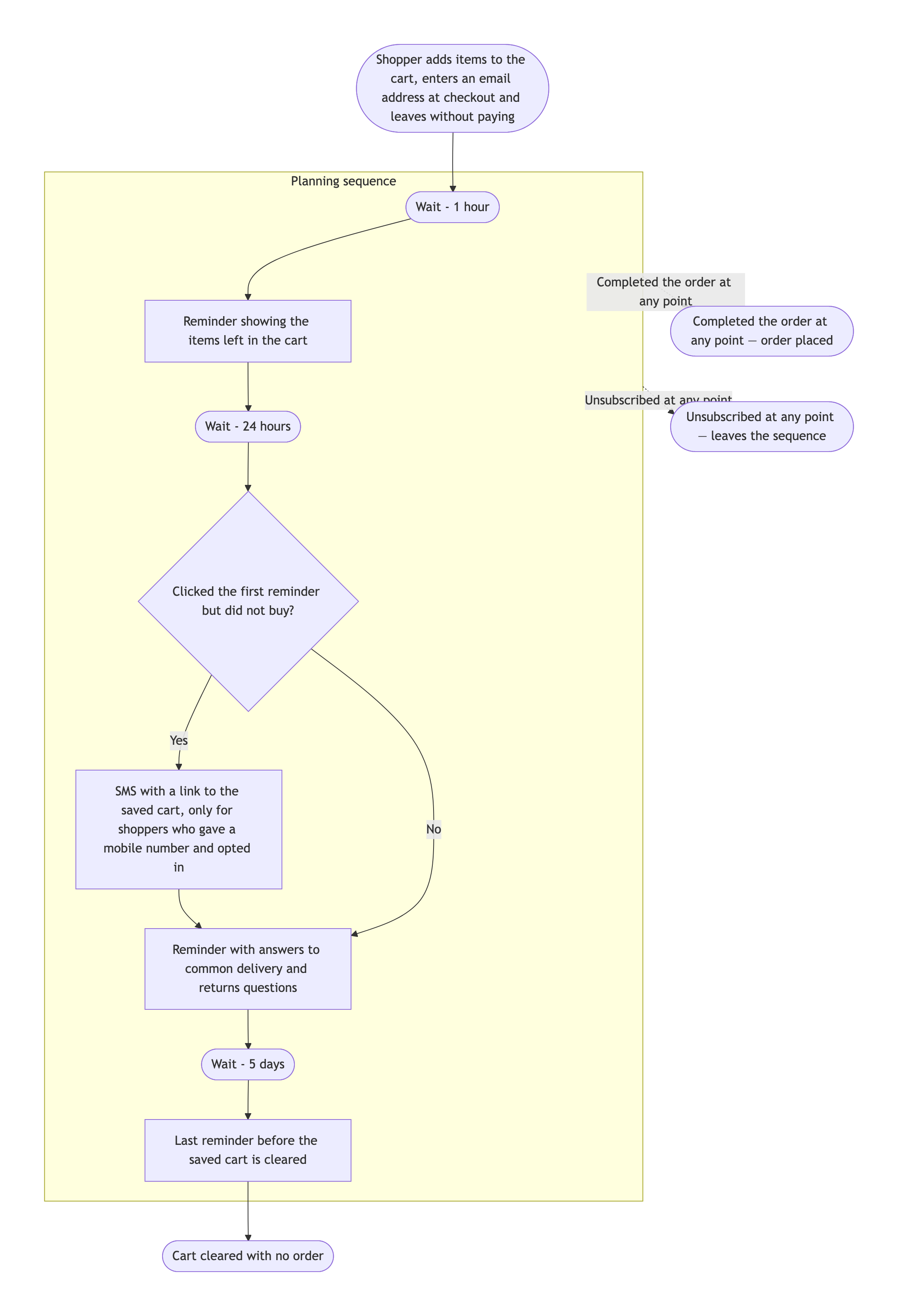
Abandoned cart flow with an SMS step and a long delay
Trigger event
Shopper adds items to the cart, enters an email address at checkout and leaves without paying
Emails and waits, in order
Wait - 1 hour
Send - Reminder showing the items left in the cart
Wait - 24 hours
Send - Reminder with answers to common delivery and returns questions
Wait - 5 days
Send - Last reminder before the saved cart is cleared
Branch conditions
Completed the order at any point? Yes → exit as Order placed
Clicked the first reminder but did not buy? Yes → send the SMS step before the second email. No → second email
Every way a subscriber leaves the flow
Order placed; Unsubscribed; Cart cleared with no order
Other channels in the flow
SMS with a link to the saved cart, only for shoppers who gave a mobile number and opted in
Uses a short first wait, a 24-hour second wait and a five-day final wait. Checks that the order exit is drawn once for the whole flow and that the SMS step sits on the correct branch.
Same task, three directions
Pick a direction to start from.
01
Waits on the arrows
A more compact welcome drip where each wait is written on the arrow between two emails instead of in its own box.
02
Abandoned cart recovery
Each reminder followed by a check for a completed order, so the chart makes clear that buyers leave the flow straight away.
03
Cross-channel digital marketing flow
Email, SMS and paid social steps side by side, for teams that plan several channels around one trigger.
What the template keeps
The parts that stay consistent.
01
Waits as written
Durations appear exactly as you give them, so the chart matches the settings you will use.
02
Exits that apply at any point
Order and unsubscribe exits are drawn once for the whole flow, which keeps the chart readable.
03
Every subscriber path ends
Each route finishes at an exit, including subscribers who never open or buy.
How to use it
From details to a result.
01
Name the trigger
The action or date that puts someone into the flow, such as a sign-up or an abandoned cart.
02
List emails and waits in order
Start each line with Send or Wait. Describe the email briefly; the chart does not write it.
03
Add conditions and exits
Say what is checked, where each answer goes and every way someone leaves, including finishing without acting.
04
Review in Vizify, then compare with your platform
Nothing runs until you send the brief. After it renders, check waits and exits against your automation settings.
Output boundaries
What to check before you use it.
This is a planning diagram. Vizify does not send emails, schedule messages or connect to your email platform.
Email copy, subject lines and offers are not written. Describe each email briefly, or add your own wording.
Vizify does not check your flow against consent or email marketing rules. Add those steps if your process needs them.
Layout is automatic, and long sequences get tall. Export choices depend on what the Vizify App currently offers.
QuestionsWill this set up the automation or send the emails?+
No. It produces an email workflow diagram you can use to plan and review the flow, then rebuild in the email tool you already use.
Can I map a drip campaign flowchart with several branches?+
Yes. Add each condition as a question with where each answer goes. Keep limits on resends so every branch reaches an exit.
Can I include SMS or social media steps?+
Yes. Add them in the other channels field and say where they sit in the sequence. For a wider digital marketing flowchart, ask for one lane per channel.
What if I have not decided a wait time yet?+
Write a question mark and Vizify will ask for it, or write TBC and it will appear on the chart exactly like that until you decide.
Can I reuse this as an email flow diagram template for other flows?+
Yes. Keep the same fields and change the trigger, emails and exits for a win-back, post-purchase or re-engagement flow.