Your data as a table or label-and-value list
Units and time periods
What the graph should show, such as a trend, ranking, share or relationship
Graph type, or Auto
Title and source note (optional)
Paste your data, name the units and say what the graph should help someone see, such as a trend, a ranking, a share of a whole or a relationship. Vizify chooses the graph type, or uses the one you pick, and builds a native Mermaid or MakeCharts chart from your values instead of an image.
Your data and choices open in Vizify for review. Nothing runs until you send it.
Your data as a table or label-and-value list
Units and time periods
What the graph should show, such as a trend, ranking, share or relationship
Graph type, or Auto
Title and source note (optional)
A native chart artifact in Vizify
A note on which graph type was used and why
Revisions on request, such as relabeling or re-sorting
A trend over time becomes a line graph, a comparison between categories a bar graph, a share of a whole a pie chart and a relationship between two measures a scatter plot. Vizify tells you which it chose.
The graph is rendered from your values by a chart engine, so bar heights, slices and point positions match the data instead of being sketched by an image model.
Gaps stay gaps. If a value is missing or unclear, Vizify asks rather than estimating, interpolating or rounding it away.
Ask for a different graph type, a new title, sorted bars or an extra series, and Vizify revises the same chart.
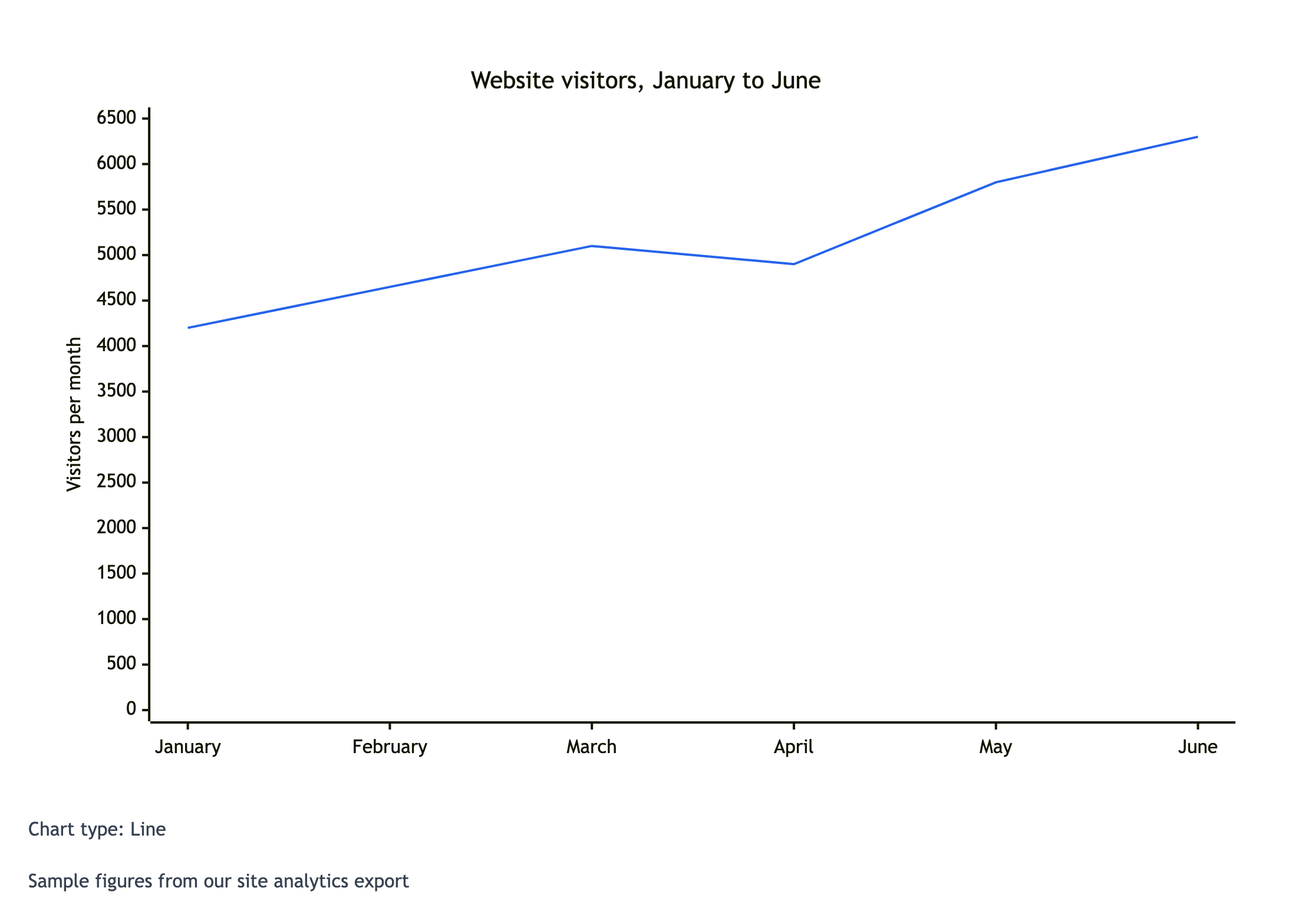
Make a graph of monthly visitors to the Harbor Lane Bakery website for January to June: 4,200, 4,650, 5,100, 4,900, 5,800 and 6,300. Units: visitors per month. I want to show the owners that traffic is growing despite the April dip. Graph type: Auto. Title: 'Website visitors, January to June'. Source note: 'Sample figures from our site analytics export'.
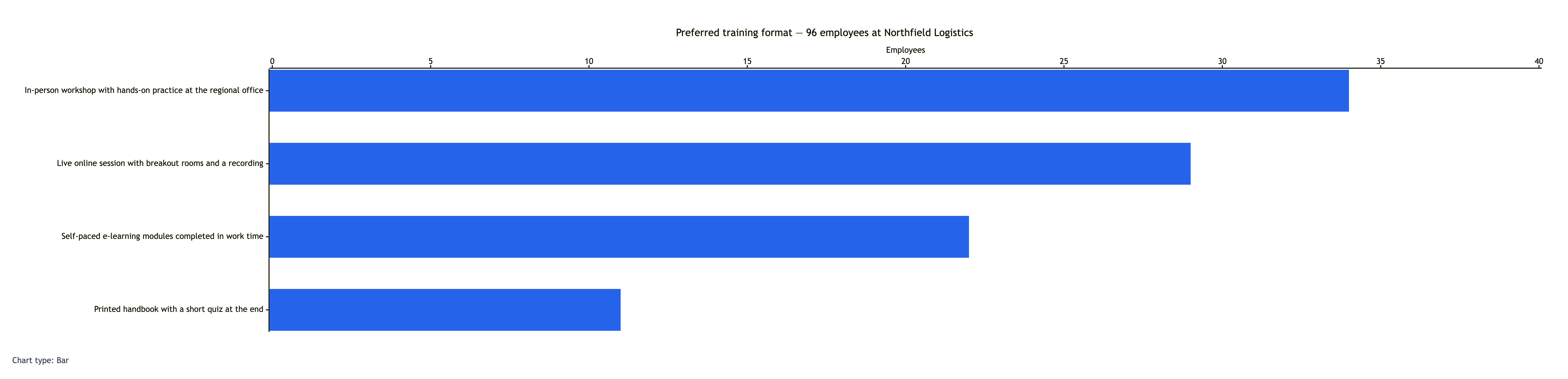
Graph these survey results for preferred training format from 96 employees at Northfield Logistics. In-person workshop with hands-on practice at the regional office: 34. Live online session with breakout rooms and a recording: 29. Self-paced e-learning modules completed in work time: 22. Printed handbook with a short quiz at the end: 11. Graph type: Auto.
Long category labels and four values that add up to the stated total of 96. Checks that labels stay intact, or are shortened only with the user's agreement, and that no count is altered.
You give it data and say what you want to show. It chooses a suitable graph type, or uses the one you pick, and builds a native chart from your numbers that you can revise in the Vizify conversation.
It looks at your data and your question. Values over time usually become a line graph, category comparisons a bar graph, parts of a total a pie chart and pairs of measurements a scatter plot. The reply says which type was used.
No. It is a native Mermaid or MakeCharts chart built from your values, so the numbers are exact. No image model is used to draw it.
Only if you ask for sample data, and then it is labeled as sample data. Otherwise Vizify uses only the values you provide and asks about anything missing.
A simple table, comma-separated rows or lines such as "Tuesday, 31". Include the units and, for time series, the dates or periods. Clear labels make the graph easier to read.
The control offers bar, line, pie and scatter. You can ask for another type, such as an area or donut chart, in your request; Vizify uses a native chart type that supports it or tells you if none does.
Preparing your data and request on this page is free and needs no account. Creating the graph requires signing in to Vizify and uses your account's current access and credit rules.
Vizify asks how to handle them. It will not interpolate, estimate or quietly drop a category, and it avoids a part-to-whole chart while the total is incomplete.
It plots the data you provide. It does not calculate regressions, forecasts or significance tests unless you supply those results yourself.
Not as a mathematical plot. List the x and y values you want and it can draw them as a line or scatter chart; for exact function plotting, a graphing calculator is the better tool.
Those tools each focus on one chart type with its own options. This one starts from your data and question and chooses the type, which helps when you are not sure which graph fits.
You can use whatever sharing and export options the Vizify App offers for chart artifacts. This page does not promise a specific file format.
Put one category or time period per line with its value, or paste a small table with headers. Name the units, and for time series make sure the periods are in order. Then write one sentence about what the graph should show: “sales are growing”, “Tuesday is the most popular day”, “more study hours go with higher scores”. That sentence is what Auto uses to pick a graph type.
Vizify follows its chart routing: a native Mermaid chart when Mermaid supports the graph, such as bar, line and pie, and a MakeCharts chart type when it does not, such as a scatter plot. Either way the chart is rendered from your values, so the axis, bars and slices match the numbers exactly. If no native type supports what you asked for, Vizify says so instead of drawing an approximation.
If you already know the chart you need, the focused tools offer more guidance for that type: the bar chart maker, line chart maker, pie chart maker and scatter chart maker.