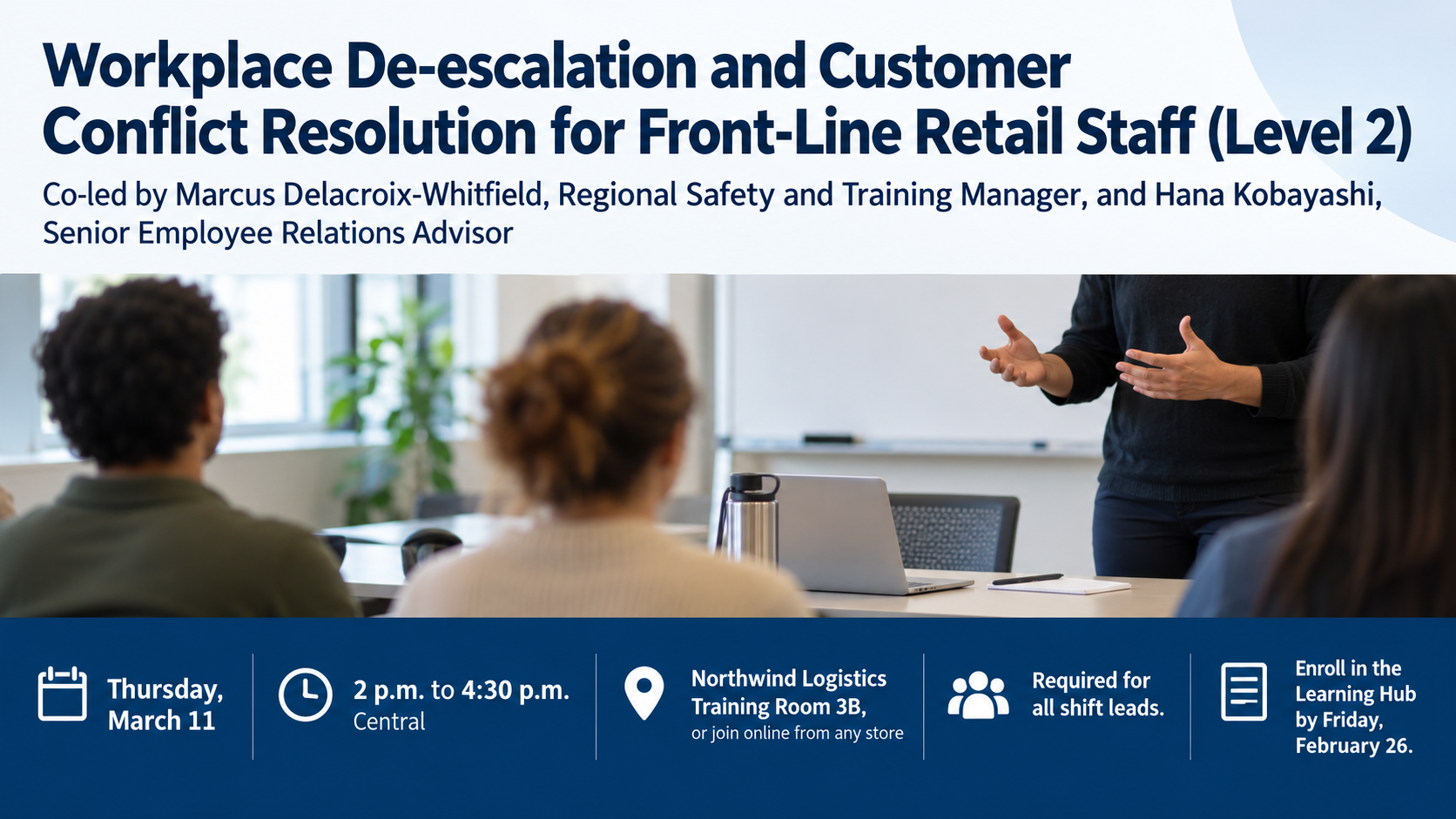
Workshop or training flyer with an agenda and sign-up band.
Fill a class or training session with a flyer that separates the topic and instructor, a short agenda, and a clear sign-up band, using only the details you enter.
One generated flyer image with title and instructor, a separate sign-up band and an agenda only when you supply one. The brief requests distinct sections; check the actual layout, instructor names, times, price and booking details before use.
Mandatory staff training with two instructors, a hybrid option and no agenda
Workshop title and topic
Workplace De-escalation and Customer Conflict Resolution for Front-Line Retail Staff (Level 2)
Instructor line, as it should appear
Co-led by Marcus Delacroix-Whitfield, Regional Safety and Training Manager, and Hana Kobayashi, Senior Employee Relations Advisor
Date, time and place
Thursday, March 11, 2 p.m. to 4:30 p.m. Central, Northwind Logistics Training Room 3B, or join online from any store
Agenda points (optional)
Left empty
Price, seats and how to sign up
Required for all shift leads. Enroll in the Learning Hub by Friday, February 26.
Long title and instructor names, a hybrid location with a time zone, and an empty agenda. Checks that no agenda points are invented and that both the room and the online option survive with the time zone intact.
Same task, three directions
Pick a direction to start from.
01
Hands-on class
A close-up of hands working with the workshop's tools or ingredients, suited to craft, cooking and maker sessions.
02
Professional training session
A clean corporate layout for training flyers aimed at internal teams, with the deadline given the most weight after the title.
03
Community evening class
Kraft-paper texture and line illustrations of the tools, for libraries, makerspaces and adult education evening workshops.
What the template keeps
The parts that stay consistent.
01
Clear sections for supplied details
The brief separates title and instructor, sign-up information and any supplied agenda. An empty agenda is omitted; inspect the generated layout.
02
A contrasting sign-up band
The brief requests a contrasting strip for booking details. Check contrast and readability in the actual image.
03
No fake codes or buttons
Nothing on the flyer pretends to be scannable or clickable.
How to use it
From details to a result.
01
Title the session and name the instructor
Write the instructor line exactly as it should be printed, including any role or organization.
02
Add a short agenda if you have one
Three to five brief points work best. Leave it empty and the flyer simply has no agenda zone.
03
Fill in the sign-up details
Date, time, place, price, seat limit and booking address go into the sign-up band as written.
04
Review, generate and proofread
The brief opens in Vizify for review before anything runs. Check the instructor's name, times and price on the result.
Output boundaries
What to check before you use it.
Generated text can contain mistakes. Check the instructor's name, the date, times, price and booking address before sharing.
It cannot create a QR code, booking page or payment link. The sign-up line is text on the image.
The instructor is not depicted and this template takes no photo; add a real headshot in a layout tool if you need one.
The result is one image in a tall, square or wide direction, not a print-ready file with bleed or an exact page size.
Agendas longer than about five points get cramped; keep each point to a few words.
QuestionsCan I make training flyers for internal staff sessions?+
Yes. Put the course name in the title, the trainers in the instructor line, and the enrollment instructions in the sign-up field. The wide direction suits break-room screens and intranet pages.
How much of the agenda should go on a workshop flyer?+
Three to five short points that tell people what they will do or leave with. If you skip the agenda, the flyer leaves that zone out rather than guessing.
Can the flyer include a QR code for sign-up?+
A generated image cannot contain a code that reliably scans. Ask for an empty square in the additional direction and add your real QR code in a design tool.
I run the same workshop every month. Do I need a new flyer each time?+
Change the date and sign-up details and generate again. Each run is a new request, so check the new date and times on the result rather than assuming they carried over.
Can I show the instructor's photo on the flyer?+
Not with this template. It shows the activity instead of a person. If you want a real headshot, leave space in the additional direction and place the photo afterward.