One Venn diagram with two or three labeled circles and your items placed in the regions you assign, including empty overlaps you mark as none. Nothing is added or moved. Check each item's region and the circle names before sharing.
Three long group names, one empty overlap and a crowded region
What you are comparing
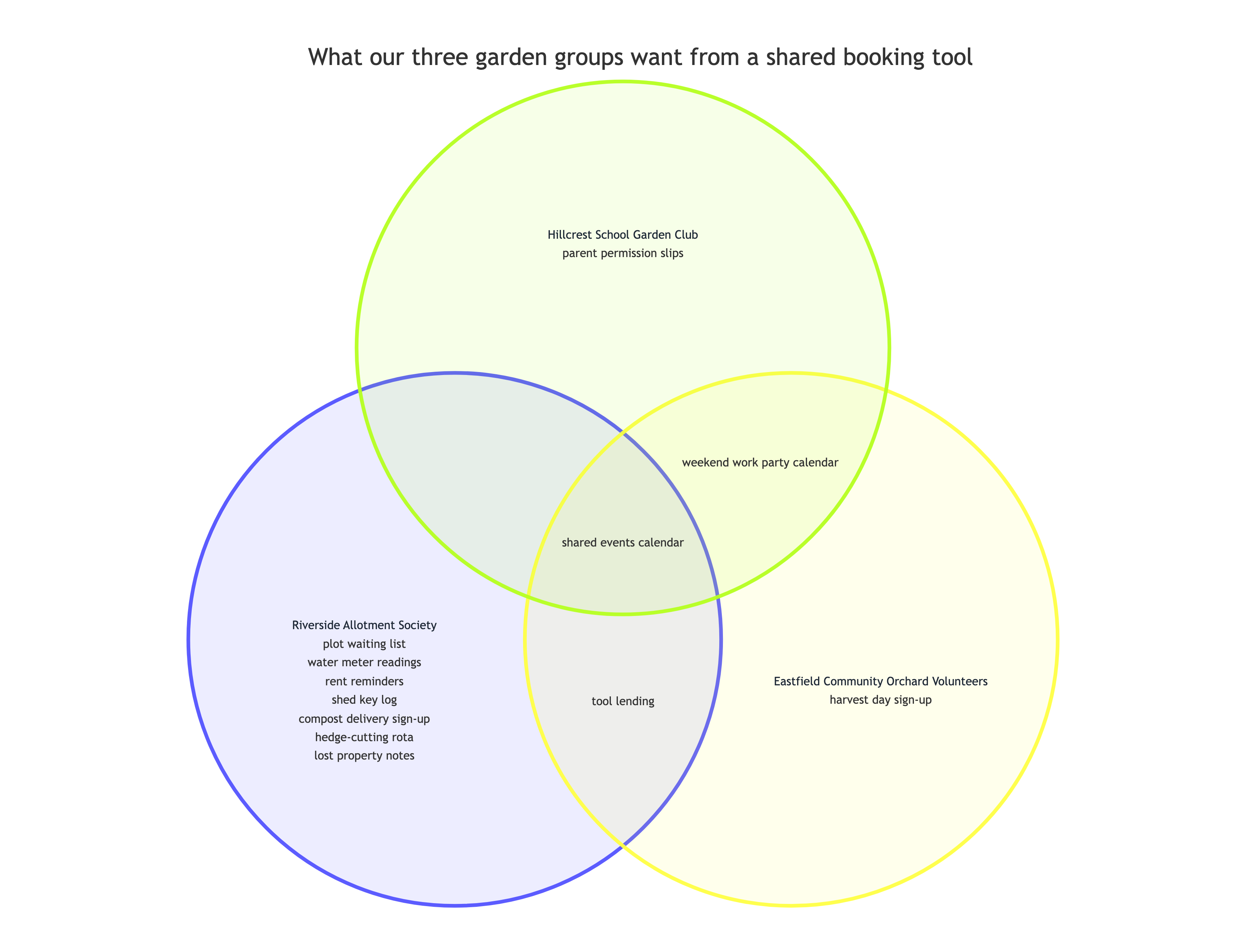
What our three garden groups want from a shared booking tool
Two or three sets
Riverside Allotment Society, Eastfield Community Orchard Volunteers, Hillcrest School Garden Club
Items by region
Riverside Allotment Society only - plot waiting list, water meter readings, rent reminders, shed key log, compost delivery sign-up, hedge-cutting rota, lost property notes
Eastfield Community Orchard Volunteers only - harvest day sign-up
Hillcrest School Garden Club only - parent permission slips
Riverside Allotment Society + Eastfield Community Orchard Volunteers - tool lending
Riverside Allotment Society + Hillcrest School Garden Club - none
Eastfield Community Orchard Volunteers + Hillcrest School Garden Club - weekend work party calendar
All three - shared events calendar
Colors or emphasis
Left empty
One overlap is marked none, so it must stay empty with nothing moved into it. Also checks that long set names stay whole and all seven items in the crowded region are kept.
Same task, three directions
Pick a direction to start from.
01
Two-circle compare and contrast
Two sets with their differences on each side and what they share in the middle. The usual layout for comparing two books, products or ideas.
02
Three circles with a named center
Three overlapping circles where the center gets its own label, for showing where all three groups meet.
03
Circles sized by your counts
Circle and overlap sizes follow survey or headcount numbers you supply, with a note that the areas are approximate.
What the template keeps
The parts that stay consistent.
01
Items where you put them
Every item stays in the region you named and appears once.
02
Empty overlaps stay empty
An overlap marked none is shown with nothing in it rather than a filler item.
03
Your labels
Set names and items keep your spelling and wording.
How to use it
From details to a result.
01
Name the topic and the sets
Two or three sets, written the way you want them labeled on the circles.
02
Place each item in a region
One line per region, such as "Writers only" or "Writers + Designers". Write none for an overlap with nothing in it.
03
Review in Vizify, then send
Your sets and items open together for review. Nothing is created until you send the brief.
04
Check every region
Confirm each item sits where you meant it and ask for any moves in one revision.
Output boundaries
What to check before you use it.
Two or three sets per diagram. Four or more circles cannot show every overlap clearly, so choose the sets that matter most.
Circle sizes and positions are automatic. Circles are drawn at similar sizes unless you supply counts, and even then the areas are approximate.
A region with many items gets crowded. Around six short items per region reads best.
No PowerPoint or Google Slides file is produced. Export options depend on what the Vizify App offers.
QuestionsCan I use this as a 3 circle Venn diagram template?+
Yes. List three sets and fill the regions, including the three pairwise overlaps and the center. Venn diagram three circles is the layout this template draws when you give three sets.
What is a triangle Venn diagram, and can I make one?+
It usually means three circles arranged in a triangle, which is how a three-set diagram is laid out here. The shapes stay circles and their placement is automatic.
What if two of my sets have nothing in common?+
Write that overlap as none. It stays empty in the diagram, which is a finding in itself and is not filled with an example.
Can I edit the diagram in PowerPoint?+
This template does not produce a slide file. The diagram is a Vizify artifact you can revise in conversation, and export options depend on what the App offers.
Can I compare four groups?+
Not in this template. With four circles some combinations cannot be shown, so pick the three that matter most or make two diagrams.