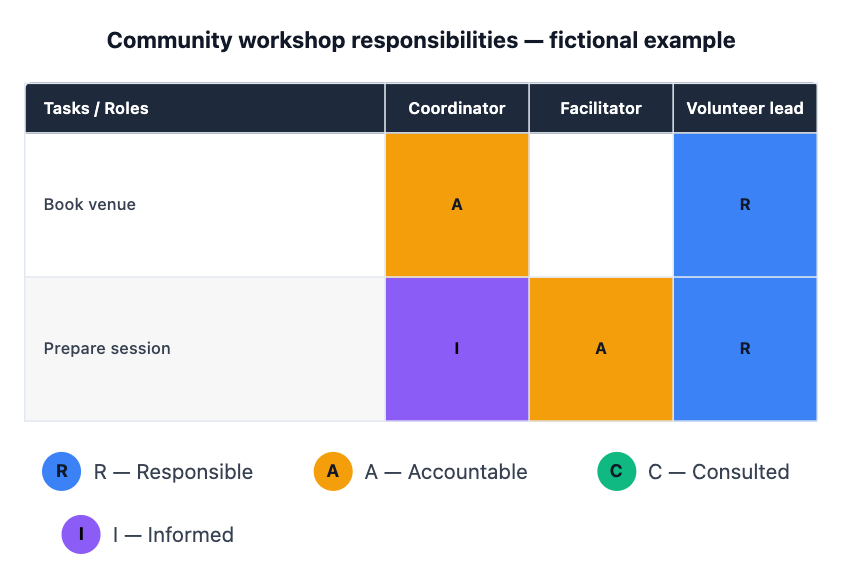
One responsibility matrix from your agreed assignments. Tasks become rows, roles become columns, and cells contain R, A, C, I or a deliberate blank. Review the matrix with the people involved before treating it as an agreement.
Book venue | Coordinator | A
Book venue | Volunteer lead | R
Prepare session | Facilitator | A
Prepare session | Volunteer lead | R
Prepare session | Coordinator | I
The venue-booking task has two Accountable entries: Coordinator and Facilitator. Who should be the single final decision owner, and should the other role be Responsible, Consulted or Informed? I will keep this conflict unresolved until you confirm the assignments rather than choosing an owner for you.
Boundary input
Missing or conflicting input
Project and scope
Workshop planning, fictional example
Roles, one per line
Coordinator
Facilitator
Volunteer lead
Task | role | R, A, C or I
Book venue | Coordinator | A
Book venue | Facilitator | A
Book venue | Volunteer lead | R
Two accountable roles on one task need clarification; the Agent must not silently choose one.
Same task, three directions
Pick a direction to start from.
01
Small project responsibility grid
A compact matrix for a short task list and the people who own it.
02
Roles rather than personal names
Use the role labels you provide when the people filling them may change.
03
Resolve accountability gaps first
Review missing or conflicting accountable owners before making the matrix.
What the template keeps
The parts that stay consistent.
01
Your labels and values
The chart keeps the supplied wording, order and data rather than inventing a complete-looking result.
How to use it
From details to a result.
01
Define the scope
Name the project or decision and the source of the notes.
02
Paste the agreed inputs
Use the field labels and keep unknown or disputed details explicit.
03
Review and send in Vizify
Nothing runs until you send the prepared brief. Check the finished chart against the source notes.
Output boundaries
What to check before you use it.
No responsibilities are inferred from job titles. The team must supply or approve the assignments.
The current chart cell holds one R, A, C or I value, not a combined RA code.
A rendered matrix does not establish consent, staffing capacity or a live project-management assignment.
QuestionsWhat do R, A, C and I mean?+
Responsible does the work; Accountable owns the outcome; Consulted gives input; Informed receives updates. Agree on those definitions before filling cells.
Can one task have two accountable people?+
Many teams use one accountable owner per task. If you list two, the template asks you to clarify rather than making the organizational decision itself.
Can someone be both responsible and accountable?+
That can happen in practice, but this renderer stores one assignment per cell. Do not silently turn a combined RA assignment into something else; agree on a supported representation first.
Does the matrix notify people or assign work?+
No. It visualizes your supplied agreement. Review and communicate responsibilities with the team yourself.